Choose the exported chat or drop it here
The .zip or .txt file from “Export chat”. It stays on your device.How to export a chat
- Android: open the chat, tap ⋮ → More → Export chat
- iPhone: open the chat, tap the name at the top, scroll down to Export Chat
- Choose Attach media / Include media if you want the photos
- Save it to Files or Drive, or send it to your own e-mail, then open it here
This is a sample chat with made-up people.
People, names and more
Who to show, and another name
About WhatsApp Chat to PDF
WhatsApp lets you export a chat, but what you get is a plain text file and a folder of photos with names like IMG-20260512-WA0007. It is hard to read and not nice to keep.
This page turns the export into a clean PDF: messages in order, days as headings, names, times, emoji, and the photos in their place. Print it, keep it, or send it to somebody who needs it. Many other converters leave the photos out or ask you to upload the whole chat. Here the file is read on your device.
This page is not connected with WhatsApp or Meta.
Features
- .zip with photos or .txt — the file as WhatsApp made it, no unpacking
- Photos in place — small, medium or large; videos and voice messages are named
- All phones and languages — iPhone and Android exports with 12- or 24-hour time, day or month first
- Searchable text — for languages with Latin letters; emoji included
- 6 styles — Bubbles, Blue, Soft, Dark, Transcript and Book
- Choose what you need — dates from/to, some people only, other names, or no names at all
- Chat numbers — messages per person, hours of the day, busiest day, most used emoji
- CSV for Excel — date, time, sender, message
- Private — nothing is uploaded and nothing is saved
The PDF
Days are headings, every person has a color, photos stand where they were sent. Choose bubbles, a dark page, a plain transcript or a book:
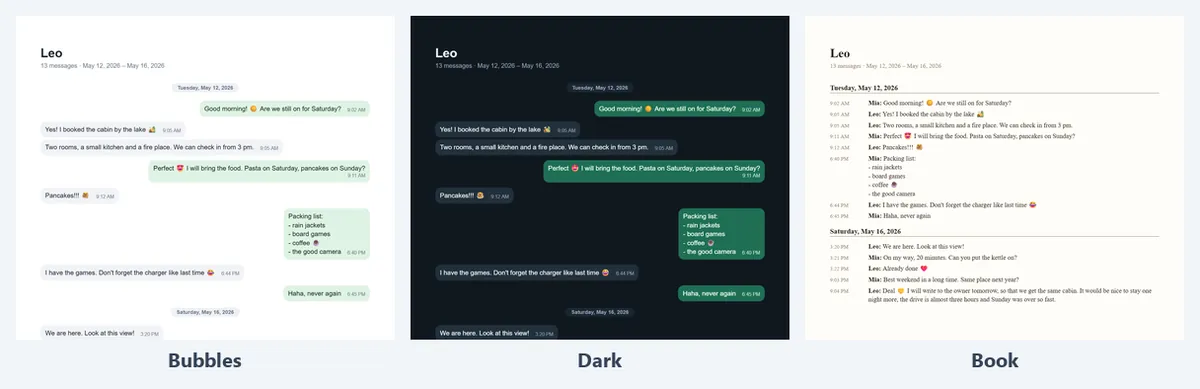
Print WhatsApp messages
Make the PDF and print it. Transcript needs the least ink and paper. With From and To you print only some days, and under "People, names and more" only some people.
Chat viewer and chat analyzer
You do not have to make a PDF. Open the .zip or .txt and look:
- Viewer — the first pages with photos appear at once, also for a chat from an old phone
- Analyzer — messages per person, days with messages, busiest day, hours of the day, words and the most used emoji
- Excel — the CSV has date, time, sender, message and file name
What you get from WhatsApp
| You choose | You get | In the PDF |
|---|---|---|
| Without media | a .txt file (Android) or a small .zip (iPhone) | all messages; "Media, not in the export" where a photo was |
| Attach media / Include media | a .zip with the text and the files | all messages with the photos |
WhatsApp limits an export: about 10,000 messages with media or 40,000 without. The newest ones are kept. For a longer chat, export it without media.
If Advanced chat privacy is switched on in a chat, WhatsApp does not allow the export.
What people use it for
- Memories — a year of family messages, a trip, the story of a couple. Try the style Book
- Work — an agreement with a customer, as a file for the project
- Proof — a landlord, a seller, a dispute. Turn on Number the messages and Show system lines, and keep the original export file too
- A new phone — keep an old chat before you delete it
- Study — the CSV for a list or a chart
Good to know
- As proof, a PDF made from a text file can be doubted. Keep the original .zip, and ask a lawyer what your court accepts
- Other people are in the chat too. Hide the names before you share it, and do not publish private messages
- Chats in Korean, Japanese, Chinese, Arabic, Hindi or Russian become pages with pictures of the text, drawn with the fonts of your device. They look right, but you cannot search in them
- A chat with many photos makes a big PDF. Choose Small photos, or a shorter time
- Text edited or deleted in WhatsApp shows as it is in the export
Frequently asked questions
How do I export the chat with photos?
Open the chat and choose Export chat, then Attach media (Android) or Include media (iPhone). You get a .zip file. Drop it here as it is.
Are my messages uploaded?
No. The file is opened by your browser. You can even turn off the internet after the page has loaded and made its first PDF.
Is it free? Is there a limit?
It is free, without a sign-up and without a limit of pages. A chat with 20,000 messages makes about 1,300 pages in some seconds on a normal computer.
Why are some photos missing?
They were not in the export: not downloaded on the phone, too old, or over the limit of WhatsApp. The line under Photos says how many are there.
The dates are wrong. What can I do?
The export does not say if 05/11 is May or November. The page finds it out from the order of the messages. If it is wrong, change Dates in the file under "People, names and more".
Can I make a PDF of a group?
Yes. Every person gets a color, and you can leave people out or give them other names.
Can I print it as a book?
Choose the style Book, a large text and A4 or US Letter. For a small book, print the PDF with the PDF Booklet Maker.
Related tools
- PDF Booklet Maker — print a chat as a small book
- Compress PDF — make a PDF with many photos smaller
- Redact PDF — black out names or numbers
- Protect PDF — add a password
- WhatsApp Link Generator — a link that starts a chat
How to use it
- In WhatsApp choose Export chat, with or without media
- Open the .zip or .txt here
- Choose who you are, the dates and a style
- Open People, names and more to hide names or number the messages
- Press Make the PDF, then Download PDF