More options
Making the PDF…
About the Gift Certificate Maker
A gift certificate is the gift that always fits: an amount, a dinner, a massage, a day out together, or a promise you keep yourself. This page makes one that looks like a real certificate and not like a note on a piece of paper. Type who it is for and what it is good for, choose a style, and print it — or save it as a picture and send it in a chat.
Small shops, hairdressers, trainers and cafés can use it too: print a sheet of blank, numbered certificates with your name, and fill them in by hand at the counter.
Features
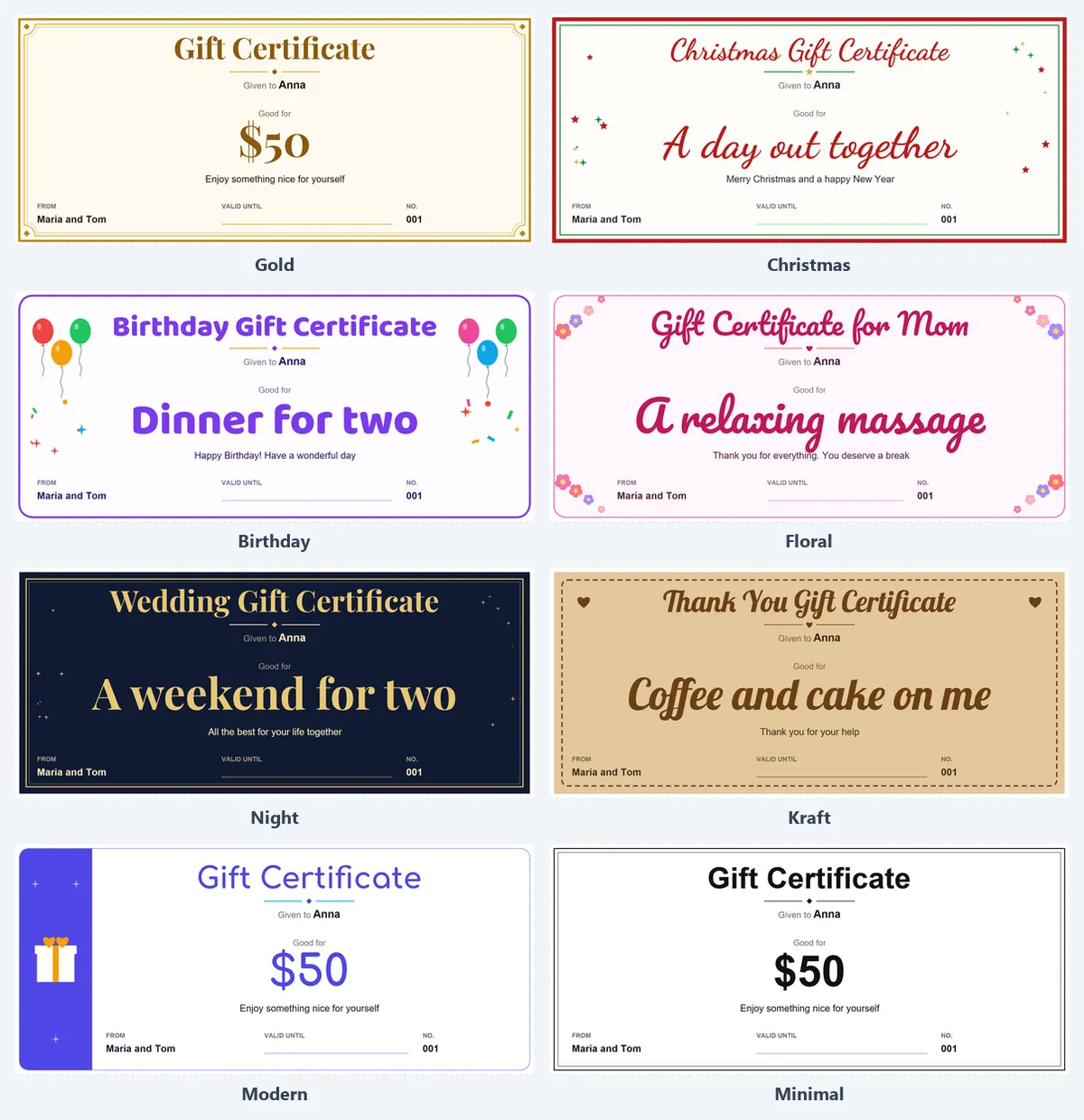
- 8 templates — Gold, Modern, Floral, Christmas, Birthday, Kraft, Night and Minimal, with your own colours and fonts
- Ready-made texts — Christmas, birthday, wedding, Mom, thank you and more
- An amount or a treat — "$50" or "Dinner for two", both look right
- 1 to 4 on a sheet — long ones fit a normal envelope
- Lines to write on — any field you leave empty becomes a line
- Running numbers — 1 to 100 certificates, No. 001, 002, 003…
- A stub — a part on the left that you tear off and keep
- PDF, print or picture — the PNG has 300 dots per inch, ready for a chat or a print shop
Free gift certificate templates
All templates are editable here in the browser: you type the text, and the certificate is ready. You do not need Word. Every template can have your own colors and heading style.
Blank gift certificates with a stub
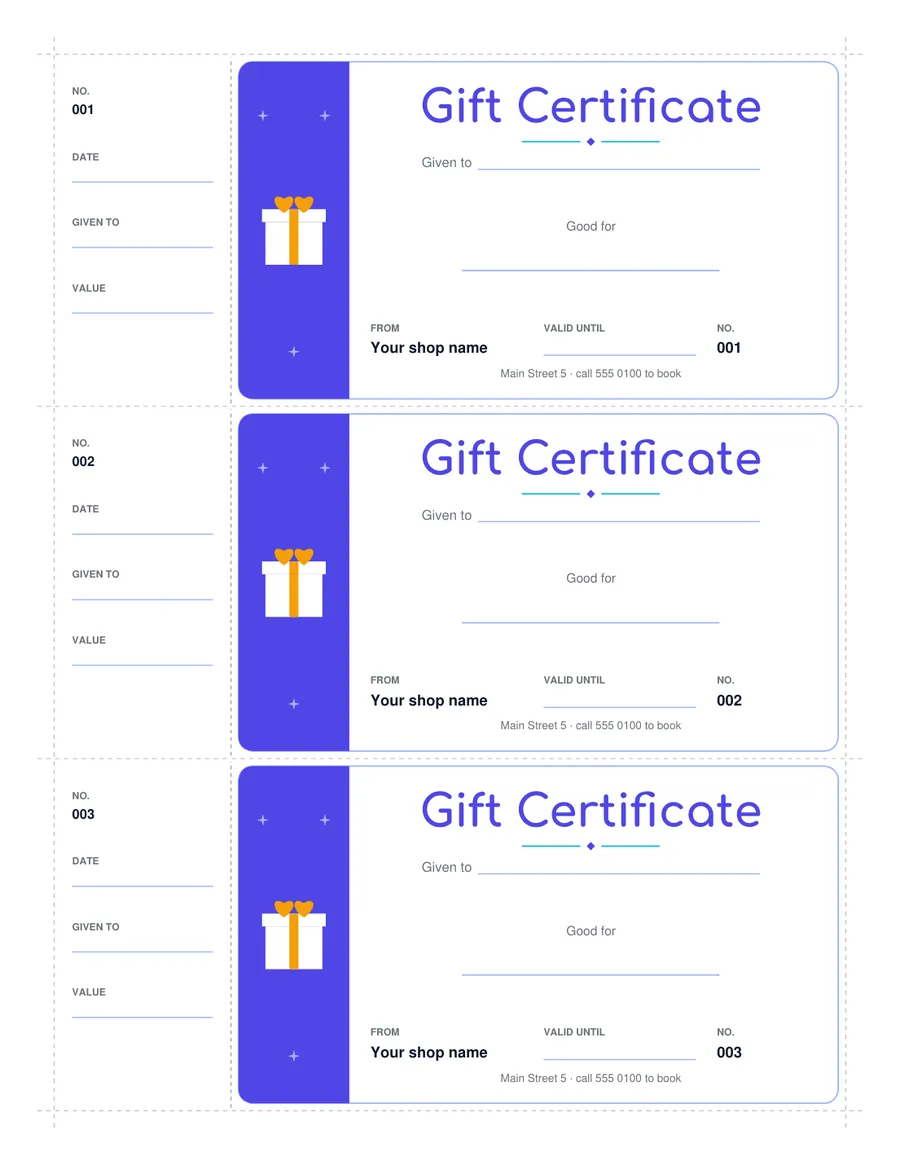
For a shop, a market or a school party: leave the fields empty, add numbers and a stub, and print as many as you need.
What to write on a gift certificate
- For a friend — "Dinner for two. Happy Birthday! I look forward to our evening"
- For parents — "A relaxing massage. Thank you for everything"
- For Christmas — "A day out together. Merry Christmas and a happy New Year"
- For a wedding — "A weekend for two. All the best for your life together"
- For children — "One movie night with popcorn. You choose the film"
- For a business — "$50. Please call 555 0100 to book. Valid for five years from the date of issue"
A certificate should say who gives it, who gets it, what it is worth and how to use it. The last point is the one people forget: an address, a phone number or "just ask me".
Sizes
| On one sheet | Size of one (US Letter) | Good for |
|---|---|---|
| 3 | about 7.5 × 3.3 in | a long envelope (No. 10), shops |
| 2 | about 7.5 × 5 in | a greeting card envelope |
| 1 | about 10 × 6.8 in | a frame, a big present |
| 4 | about 5 × 3.7 in | small gifts, saving paper |
On A4 paper the certificates are almost the same size. Thick paper (200–250 g/m²) feels like a real certificate. Choose Actual size in the print window.
Ideas for what to give
- Time together — a breakfast, a museum, a hike, a concert, a day at the sea
- Help — babysitting, gardening, moving day, a computer fixed, one month of dishes
- A treat — massage, hairdresser, a book of their choice, a cooking class
- Food — dinner for two, a cake every month, coffee for a week
- For kids — a late bedtime, a movie night, a day where they choose everything
- Money with a purpose — "$50 for your trip", "$100 for the new bike"
For shops and small businesses
- Type your shop name in From, and leave Given to and Good for empty
- Under More options write how to redeem it: address, phone number, opening hours
- Turn on Print a number and Add a stub. Write number, date and value on the stub and keep it, so you know which certificates are open
- Check the rules of your country. In many places a gift certificate must be valid for a minimum time — often several years — and you must be able to show which ones were sold
Good to know
- Use your own name. A certificate with the name of a store you do not own is not valid there
- The page has no codes or barcodes on purpose. It is a certificate from you, not a store card
- Your last text stays in this browser, so you can print it again
Frequently asked questions
Is it free?
Yes, also for a shop. There is no sign-up and no watermark, and no web address is printed on the certificate.
How do I send it by phone?
Press Download image (PNG) under the close-up and send the picture. It is sharp enough to print later.
Can I write on it by hand?
Yes. Leave a field empty and a line is printed. The button Blank, to fill in by hand makes a whole sheet of them.
Does a gift certificate need an end date?
A private one does not. Choose Does not expire — people like that. For a business, the law of your country decides; many countries ask for a long time or do not allow an end date.
Can I change the colours?
Yes. Choose a style first, then a set of colours and a heading style.
Do you have a template for Word?
You do not need one. Type your text here and download the PDF. If you want to go on in Word, save the picture and insert it there.
Is anything uploaded?
No. The PDF is made in your browser, and your text stays on your device.
Related tools
- Coupon Book Maker — a book of small promises
- Greeting Card Maker — a card to go with it
- Certificate Generator — awards and diplomas
- Printable Gift Tags — tags for the presents
- Raffle Ticket Maker — numbered tickets with stubs
How to use it
- Press an occasion, or start with Any gift
- Type who it is for, what it is good for, and your name
- Choose a style and how many go on one sheet
- Open More options for rules, numbers, a signature line or a stub
- Press Print or Download PDF, or save the picture to send it