Choose your Instagram export or drop it here
The ZIP file, or followers_1 and following (JSON or HTML). It stays on your device.How to get the file from Instagram
- Open Instagram, then Settings → Accounts Center (newer apps: Meta Account)
- Tap Your information and permissions → Export your information (older apps: Download your information)
- Tap Create export, choose your profile, then Export to device
- Choose only Followers and following. Set the date range to All time and the format to JSON
- Wait for the e-mail from Instagram, download the ZIP and drop it above. You do not need to unpack it
Open the export page on Instagram
Menu names change a little from app version to app version. The file is often ready in minutes, but it can take longer.
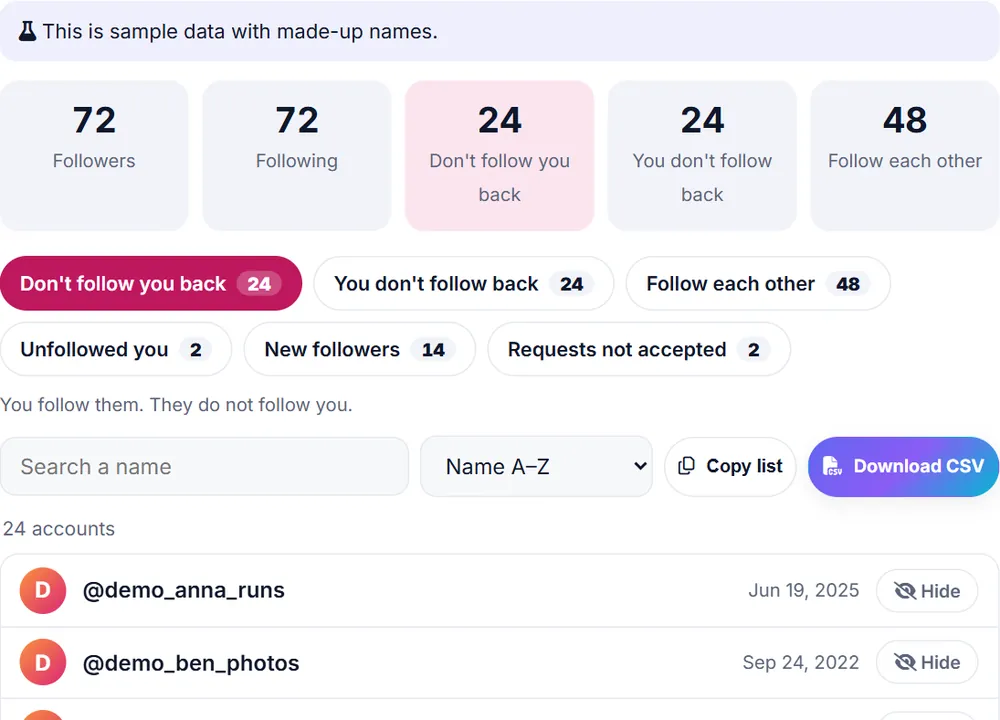
This is sample data with made-up names.
About Who Doesn't Follow Me Back
Most "unfollowers" apps ask for your Instagram password, or they use your login in the background. Both can get an account locked. This page needs neither. Instagram lets you download a copy of your own data, and that copy has two lists: the people who follow you and the people you follow. This page compares the two lists on your device and shows the difference.
You get three answers at once: who does not follow you back, who follows you but you do not follow back, and who is mutual.
This page is not connected with Instagram or Meta.
Features
- No login — no password, no browser extension, nothing that acts in your name
- The ZIP as it is — no unpacking; even an export of many GB opens at once, because only the list files are read
- JSON or HTML — both formats of the export work, also the loose files
- All parts of a big list — followers_1, followers_2, followers_3… count as one list
- Who unfollowed me — save a list, come back later, and see who left and who is new
- Hide accounts — take stars, shops and news pages out of the list
- Search, sort, copy, CSV — for a list you can work through
- A warning for cut exports — when the file seems to miss your older followers
What you see
The numbers at the top, then a tab for each list. Search a name, sort by date, hide accounts that will never follow back, and save the list as CSV. Press Try it with sample data to see it before you have your own file.
Without an app, without a login
Many "unfollow tracker" apps and browser extensions work with your login. Instagram does not allow that and can limit the account or ask for a new password. The official way is the export of your own data. It has the files followers_1.json and following.json, and that is all that is needed to find the unfollowers. This page is the missing part: it reads the two files and compares them.
The most common mistake: the date range
When you ask Instagram for the export, it also asks for a date range. If you pick one year, the file has only the people who followed you in that year. Older friends are missing, and every tool then says that they do not follow you back.
Always choose All time. This page looks at the dates in your file and warns you when nothing is older than about 13 months.
What is in the export
| File | What it is | Used here for |
|---|---|---|
| followers_1.json, followers_2.json… | people who follow you | all lists |
| following.json | people you follow | all lists |
| pending_follow_requests.json | requests you sent that are not accepted | "Requests not accepted" |
| recently_unfollowed_profiles.json | accounts you stopped following | "You unfollowed" |
Files you have no data for are simply missing in the ZIP. That is normal. The lists are in the folder connections / followers_and_following.
Who unfollowed me?
Instagram does not keep a list of people who unfollowed you, so no honest tool can read it from one export. Two exports are enough:
- Open your export here and press Save this list on this device
- Some weeks later, get a new export and open it on the same device and browser
- The tabs Unfollowed you and New followers appear
You can also press Compare with an older export and choose an old ZIP that you kept.
A name can also disappear because the person changed the user name, closed or paused the account, or was removed by Instagram. Look at the profile before you decide.
Good to know
- Unfollow people by hand in the app, a few at a time. Tools that unfollow hundreds of people for you are what gets accounts blocked
- Big accounts — stars, brands, news — almost never follow back. Press Hide once and they stay out of the list, also next time
- A name you opened is crossed out, so you know where you stopped
- The export is a snapshot. People who followed you after you asked for it are not in the file
Frequently asked questions
Is it safe to use?
Yes. You do not log in anywhere, and the file is read by your own browser. It is not uploaded. Instagram cannot see that you used this page, because the page does not talk to Instagram.
How long does the export take?
Often a few minutes for "Followers and following" only, sometimes hours. Instagram sends an e-mail when the file is ready. The download link works only for a few days.
Does it work on a phone?
Yes. Download the ZIP to your phone, open this page and choose the file. On iPhone it is in the Files app under Downloads.
Can I check another person's account?
No. The export only exists for your own account.
The tool says people do not follow me, but they do. Why?
Nearly always the export is not complete. Ask for a new one with the date range All time. It can also be that the person followed you after the export was made.
Is there a website that shows who doesn't follow me back without login?
This page. It never asks for your name or password. You give it the export file, and the file stays on your device.
Can I use it for TikTok or X?
No. It reads the export of Instagram only. The files of other networks look different.
Why is the number different from the number on my profile?
The export can leave out accounts that are paused or being deleted, and it is some hours or days older than your profile. A small difference is normal.
Is my list saved?
Only if you press Save this list on this device. It then stays in this browser until you press Delete the saved list or clear the browser data.
Related tools
- Text Diff — compare any two texts
- Compare Excel Files — find what is in one file and not in the other
- Remove Duplicate Lines — clean up a list of names
- ZIP and Unzip Files — look inside a ZIP
How to use it
- In Instagram, ask for an export of Followers and following, date range All time, format JSON
- Download the ZIP when the e-mail arrives
- Choose the ZIP here, or drop it on the box
- Look at the tab Don't follow you back
- Press Hide on accounts that will never follow back
- Press Save this list to see next time who unfollowed you